Site Front by Chote Works

For small businesses

A website that answers your customers and sends you the job details.

When someone looks at your site after hours, the assistant answers their questions from facts you’ve approved, asks for the details you’d normally ask for, and sends you an enquiry you can quote from. I build the site and set everything up, and your part is checking I’ve got the facts right.

Chat with us Online · 9:47pm

How much for a driveway? About 60 square metres, pretty mouldy.

Driveways are priced on size and condition, so the team confirms a quote after seeing photos. Which suburb are you in?

Palmerston. Any day next week is fine.

Palmerston’s in the service area. Here’s what I’ll send through. Can you check it’s right?

Job
Driveway clean, ~60 m², heavy mould
Suburb
Palmerston
Timing
Any day next week
Send enquiry Edit
Illustration of the flow. The customer checks the summary before anything is sent.

What you get

What’s in Site Front

Everything below is set up for you as one job, so there’s nothing to piece together yourself.

  • A website built around your business

    I write the pages from what you tell me about your services, your area and the questions customers ask. It’s quick on a phone, and your number is one tap away on every page.

  • An AI assistant that knows your business

    It only answers from facts you’ve signed off: your services, the areas you cover and what you will and won’t price. It’s there at any hour, including when you’re busy with a customer.

  • Enquiries with the details filled in

    The assistant asks what you’d ask, like where, what the job is and when. The customer checks the summary before it’s sent, and if sending ever fails they see your phone number instead.

  • Notifications and your other systems

    When an enquiry comes in you can get a notification straight away, and the details can be added to the systems you already use, like a spreadsheet or your CRM.

  • A monthly report

    Each month you get a report on what people are asking the assistant about, where they drop off and how the conversations end. It shows you what customers want to know before they get in touch.

  • Found on Google

    The basics Google needs to show you to people in your area are set up from day one. If you’re moving from Wix, Squarespace or an old site, I point every old page address at its new page so you keep the rankings you’ve built up.

How it works

Your part: one conversation and a look at the preview.

  1. One call

    About 45 minutes. We go through your services, your area, how you price your work and the questions you answer every week.

    You talk

  2. I build it

    I write the pages, design the site and set up the assistant. You get a private preview link so you can click through it, show people and tell me what to change.

    You review

  3. You go live

    Once you’re happy, it goes live on your domain and enquiries start coming through.

    You answer enquiries

The work

Try it for yourself

There’s one live client site and one demo. Both are public, so you can test them before you talk to me.

Live Client · Darwin, NT

Top End Pressure Cleaning

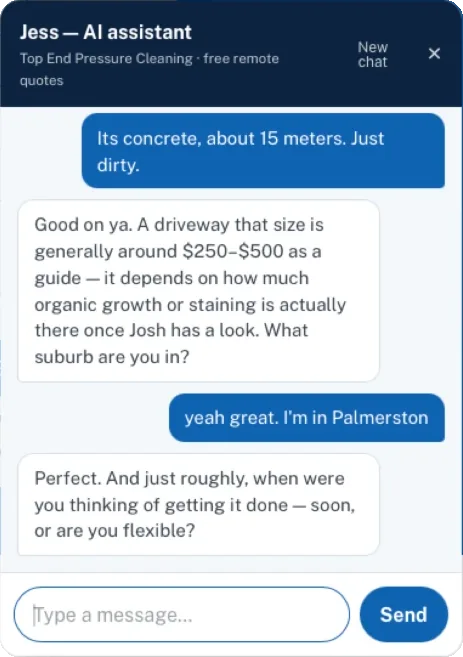
A new pressure cleaning business in Darwin. I moved it from a hand-coded site onto Site Front and set up an assistant called Jess, who answers questions and takes quote details at any hour. The business is new, so the site doesn’t claim reviews or years in business it doesn’t have yet.

  • Phone-first quote flow
  • AI assistant, “Jess”
  • Service-area SEO
Visit the live site(opens in a new tab)
Screenshot of Jess, the assistant on Top End Pressure Cleaning’s website, asking a customer in Palmerston about a 15 metre concrete driveway
A real chat on Top End Pressure Cleaning’s site. The price range is the owner’s own guide. Without one, the assistant won’t name a price.
Try it now Public demo · fictional business

Marlow Creek Garden Care

Marlow Creek Garden Care is a made-up business that I use to test every Site Front change before it goes near a client’s site. The business isn’t real, but the assistant is the same one your customers would use, so ask it whatever a customer would. If you ask it for a price it won’t make one up, and if you give it a pretend job you can see the summary it puts together.

Open the demo(opens in a new tab)

The assistant

What the assistant will and won’t do

The biggest risk with a chatbot is it telling a customer something that isn’t true, so this one is set up to stay within what you’ve approved.

  • It only answers from facts you’ve approved, and if it doesn’t know something it says so.
  • It doesn’t make up prices, availability, licences or reviews.
  • Nothing is sent until the customer reads the summary and taps “Send enquiry”.
  • The same enquiry can’t reach you twice, however many times someone taps the button.
  • There are daily limits on spam and AI usage, so a bot can’t flood the assistant or your inbox.
  • Your customers’ names and numbers aren’t logged anywhere they don’t need to be.

Who it suits

  • You run a small business and most of your work starts with an enquiry.
  • You miss calls or messages because you’re busy with customers or on a job.
  • You answer the same handful of questions before anyone books.
  • Your current site is out of date, or you don’t have one yet.

Who’s building it

Hi, I’m Nick

I build Site Front websites for small businesses like yours. I’ve spent 15+ years working on the software that keeps water utilities, mines and hospitals running. They’re maintenance systems, where a job that slips through the cracks costs real money, and I started out hands-on with the databases, integrations and go-lives.

These days I use AI every day to build things, and Site Front is the result: a website, an assistant and the enquiry follow-up, set up properly for small businesses. I build every site myself, so you deal with me the whole way through.

More about Chote Works

Questions

Common questions

Will the AI say something wrong to my customers?

It only answers from the facts we agree on, and it’s set up to say it doesn’t know and pass the question on rather than guess. It won’t quote a price you haven’t approved, and it doesn’t book or promise anything, so you still read every enquiry and decide what happens next.

Do I have to change my phone number or email?

No, your number stays on every page, one tap to call on a mobile, and enquiries go to the inbox you already use.

I’m on Wix / Squarespace / an old WordPress site. Is that a problem?

No, that’s where most people start. I move your content across, point every old page address at the right new page, and switch your domain over once you’re happy.

What’s in the monthly report?

What people asked the assistant about most, where conversations dropped off and how they ended. It helps you see which questions customers have before they book, and where they’re getting stuck.

Why work with one person rather than an agency?

You deal with the person who builds it, from the first chat to launch day and after. You can also test the live client site and the demo before you talk to me.

I’m not a computer person. How much do I have to do?

You don’t have to do much at all. You talk me through the business and check the preview, and I write the pages and do all of the setup.

Where do the enquiries go?

To the inbox you already use, with the job details laid out. You can also get a notification when one comes in and have the details added to the systems you already use.

Will your branding be on my site?

Just a small “Built with Site Front by Chote Works” line in the footer. Everything else is your business name, on your domain.

Get in touch

Let’s have a chat about your business.

If you think Site Front could suit your business, send me an email with a bit about what you do. We can have a chat and go from there.